Electronic signatures for every business, in English and Spanish
Upload a PDF, Word file or photo, place the fields, and send. Your clients sign from any phone without an account, and you get a sealed PDF with a certificate that proves who signed and when.
Free plan, no card needed. Paid plans add more documents, templates and reminders.
- Legally binding under ESIGN and UETA
- Tamper-evident digital seal
- Independent time stamp
- English and Spanish
- Data stored in the United States
Signed in three steps
Upload
Drop in PDFs, Word files or photos. Up to 10 documents go out together as one packet.
Place fields and send
Click to place signature, initials, date and text fields, or let markers in your document place them. Add signers and send.
Signed, sealed, filed
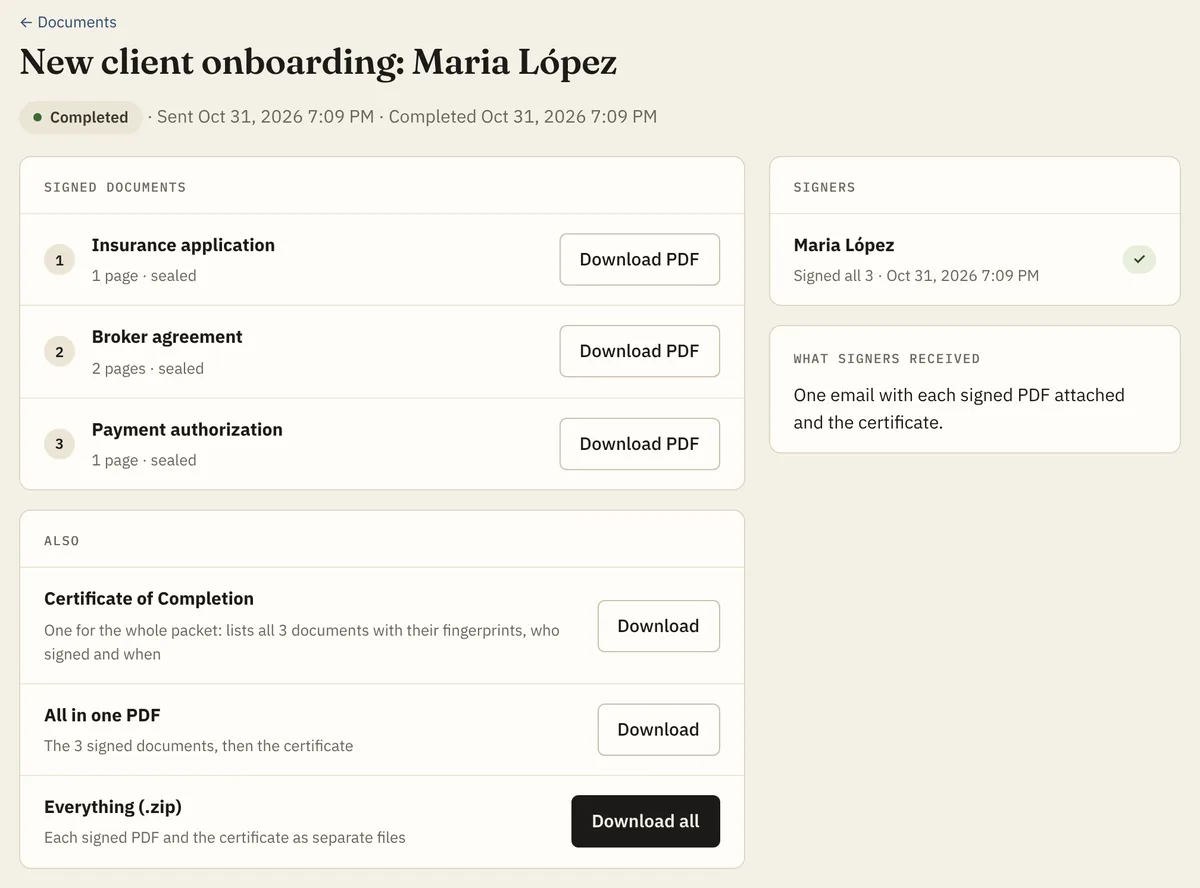
Each person signs from their phone. Everyone gets the sealed PDFs and the certificate; you can download them any time.
Everything a signature needs, nothing it doesn't
From the first upload to the sealed copy in your files.
Sending
- PDF, Word or phone photos; up to 10 documents in one packet
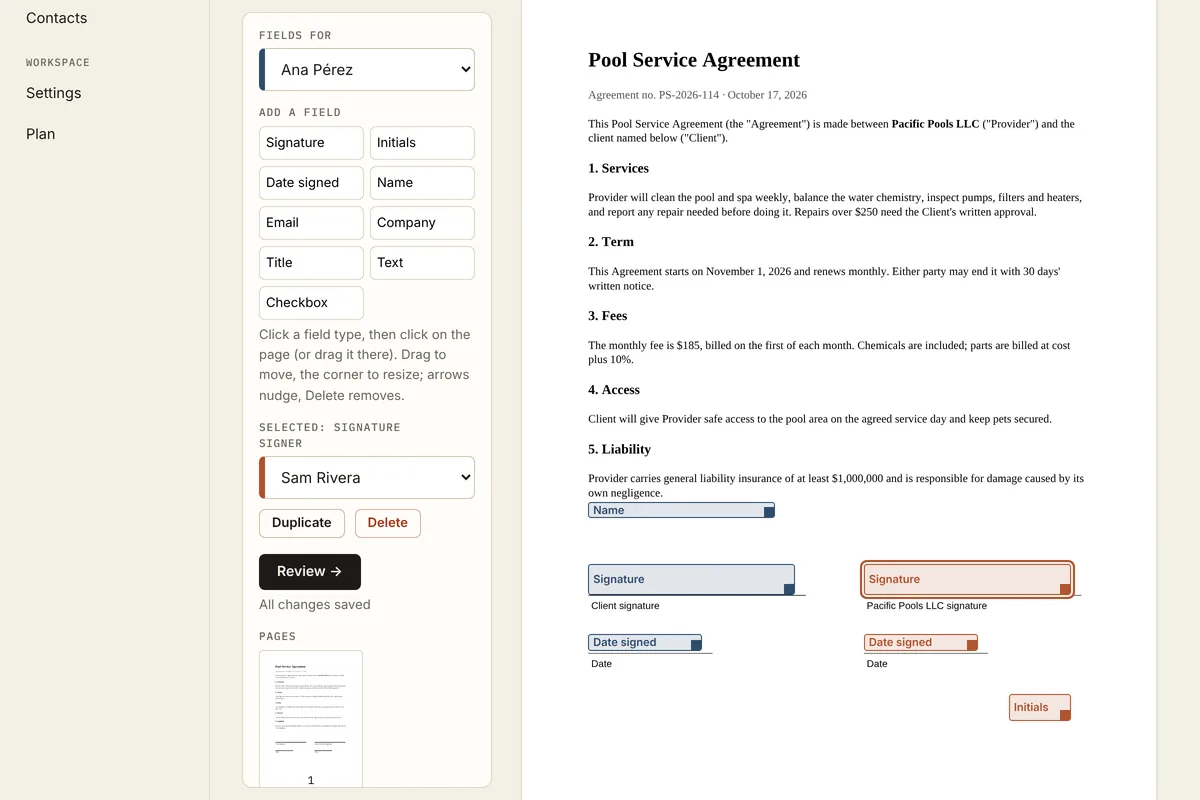
- Field editor: signature, initials, date, name, email, company, title, text, checkboxes
- Signing order, people who only get a copy, a language per signer
- Templates with roles ("Client", "Agent") for your whole team
- Drafts saved at every step; copy any document as new
Following up
- Automatic reminders every few days until each person signs
- See who opened, signed or declined, step by step
- Resend, correct a signer's email, extend or void
- An activity page that shows what needs your attention
Signers
- No account and nothing to install; works on any phone
- Guided field to field, in English or Spanish
- Optional code by email to confirm who is signing
- Several documents in one visit, with one "Finish"
Proof
- Consent to electronic records under ESIGN and UETA
- Digital seal that reveals any change to the signed PDF
- Independent time stamp (RFC 3161)
- Certificate of Completion with every event, from an append-only log
Teams
- One workspace per company, with your logo and name on emails and signing pages
- Roles: owner, admin, sender and viewer
- Export all your signed documents whenever you need them
- Plans and billing in your S+M account
Connect
- REST API with keys per workspace
- Signed webhooks: choose the events each system receives
- Works with the systems you already use: CRM, project management, accounting or your own software
- Ready-made apps in the S+M Apps store
See what each plan includes on the pricing page, learn the details in the guides, or build your own connection with the API and webhooks.
A field editor that stays out of the way
Click a field and the page, or drag it there. Resize from the corner, nudge with the arrow keys, and every change saves itself. Documents with markers get their fields placed for you.
Signing that feels easy on a phone
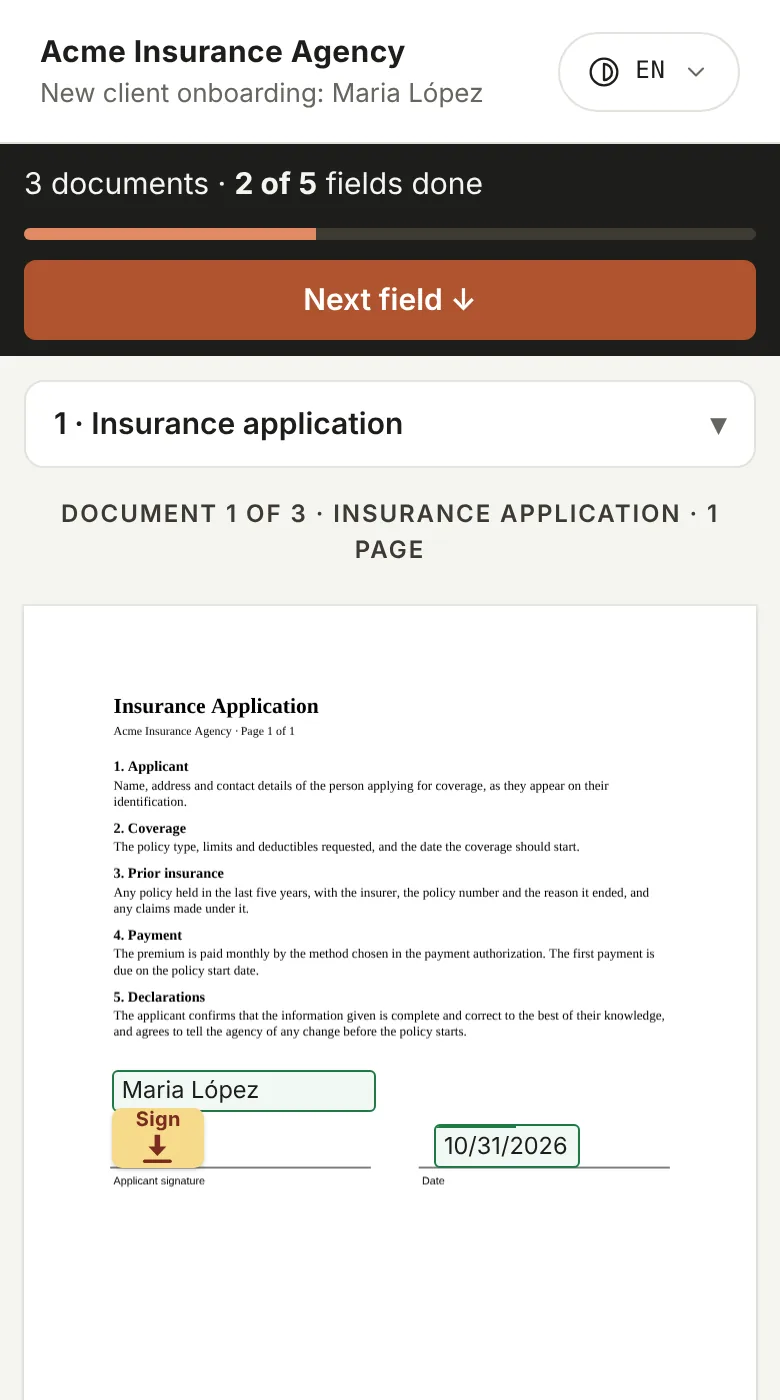
A progress bar, a "Next field" button and plain instructions in their language. No app, no account, no password.
Built to protect your documents and your clients
Encrypted
In transit and at rest, with data stored in the United States.
Every upload scanned
Files are checked for viruses before anyone opens them.
Two-factor sign-in
Everyone on your team signs in with their S+M account, which offers two-factor sign-in and passkeys.
A record nobody can edit
Every event goes into an append-only audit log, chained by fingerprints so any change would show.
Any document that needs a signature
Insurance
Applications, broker agreements, payment authorizations
Real estate
Leases, listing agreements, disclosures
Contractors
Estimates, contracts, change orders
HR and hiring
Offer letters, policies, onboarding forms
Professional services
Engagement letters, NDAs, consent forms
Questions about dVellum
Is an electronic signature from dVellum legally binding?
Yes, for most business documents in the United States. The federal ESIGN Act and state UETA laws give electronic signatures the same weight as ink when the signer agrees to sign electronically, which dVellum records. Each document is sealed and comes with a Certificate of Completion as proof.
What can't be signed electronically?
Under the federal ESIGN Act, some documents are excluded, for example wills and testamentary trusts, adoption, divorce and other family-law documents, court orders, and certain notices such as utility shut-off, eviction or foreclosure. Documents that must be notarized still need a notary; remote online notarization depends on the state. State laws vary, too. This is general information, not legal advice: check with your lawyer if you are unsure about a document.
Do my clients need an account to sign?
No. Each signer gets a private link by email and signs in their browser, on a phone or a computer, with nothing to install. On paid plans you can also ask for a code sent to their email before they open the document.
Can clients sign in Spanish?
Yes. The signing pages and every email signers receive are in English or Spanish, chosen for each signer, and your workspace sets the default. The "Signed by" line on the PDF and the Certificate of Completion are in the document's language.
Can I send several documents to sign at once?
Yes. Up to 10 documents go out together as one packet: signers get one email and sign them all in one visit. Each document comes back as its own sealed PDF, with one Certificate of Completion for the packet, and the packet counts once on your plan.
How do I prove a document wasn't changed after signing?
When everyone has signed, dVellum seals each PDF with a digital seal and an independent time stamp (RFC 3161), so any later change is detectable. The Certificate of Completion lists each document's SHA-256 fingerprint and every event from the append-only audit log: who viewed, consented and signed, and when.
Is there a free plan?
Yes. The Free plan needs no card: sign in with your S+M account, create your workspace and send. Paid plans add more documents each month, more people, templates and automatic reminders, and each starts with a free trial.
Can I connect dVellum to my own software?
Yes. dVellum has a REST API with keys for each workspace, and signed webhooks that tell your systems when documents are viewed, signed or completed. Ready-made apps in the S+M Apps store connect it without writing code. The API, webhooks and apps come with the Premium plan.
Send your first document today
Start free, no card. Upgrade when your team needs more.